 DEUSHARVEST
Percent Change (PCTCHANGE)
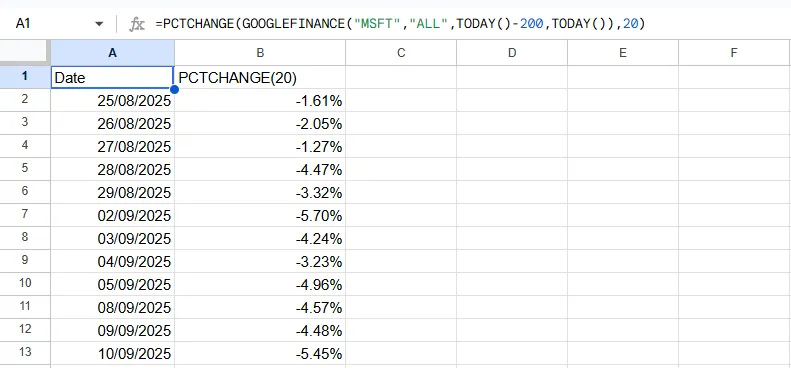
Percent Change (PCTCHANGE) measures the percentage difference between the current price and a past price. It is the simplest form of momentum and is identical to a Rate of Change (ROC) calculation where the result is typically expressed as a decimal (e.g., 0.05 for 5%).
PCTCHANGE
=PCTCHANGE(data, period) Example Usage
=PCTCHANGE(A2:F500, 1)
Parameters
| Parameter | Type | Description | Status |
|---|---|---|---|
data | Range | The input range of columns containing the Date, Open, High, Low, Close, and Volume data. | Required |
period | Number | The number of periods to look back. Defaults to 1 (daily return). | Optional |
Returns
A two-column array of dates and their corresponding percent change values.
Source Code
Copy the following code into your Apps Script editor (Extensions > Apps Script) to use the PCTCHANGE function in your spreadsheet.
pctchange.js
/**
 * Calculates the Percentage Change between the current value and the value n periods ago.
 *
 * @param {array} data - The input range containing metrics. Can be a multi-column range (Date, Open, High, Low, Close, Volume) or a two-column range (Date, Value).
 * @param {number} [period=1] - The number of periods to look back. Defaults to 1.
 * @returns {array} A two-column array with headers "Date" and "PCTCHANGE".
 * @customfunction
 */
function PCTCHANGE(data, period = 1) {
    checkPremium();

  // Argument validation
  if (arguments.length < 1 || arguments.length > 2) {
    throw new Error(`Wrong number of arguments. Expected 1 or 2, but got ${arguments.length}.`);
  }

  const processedData = getData(data);

  // --- NEW: Function-level validation ---
  const columnCount = processedData[0].length;
  if (columnCount > 2 && columnCount < 5) {
    throw new Error(`Invalid data structure for PCTCHANGE. For multi-column data, expected at least 5 columns (Date, O, H, L, C), but got ${columnCount}. For simple data, expected 2 columns (Date, Value).`);
  }
  // --- END of validation ---

  const dates = processedData.slice(1).map(row => row[0]);
  const values = getValues(processedData);

  if (values.length <= period) {
    throw new Error(`Invalid data. Percentage change with a period of ${period} requires at least ${period + 1} data points.`);
  }

  let results = [["Date", `PCTCHANGE(${period})`]];

  for (let i = period; i < values.length; i++) {
    if (values[i - period] === 0) { // Avoid division by zero
      results.push([dates[i], 0]);
      continue;
    }
    const pctchange = (values[i] - values[i - period]) / Math.abs(values[i - period]);
    results.push([dates[i], pctchange]);
  }

  return results;
}